
|
VMINF VM administration
The VMINF command provides an overview of all VM systems from a single screen. The individual guest systems can be administered from this screen by means of Action Codes.
srch Only the VM systems whose names contain the specified search string will be displayed in the list. A simple or complex search condition can be specified for srch. For further information, see page .
LOC=D|H The position of the VM systems in main memory will be displyed in the LOCATION column of the VMINF screen (see below). The value can be displayed in either hexadecmal (default) or decimal format. In both cases the value represents the number of megabytes from which the VM system is loaded. The first megabyte begins at location 0.
Examples:
VMINF RUNNING
Only running VM systems will be displayed in the list.
VMINF LOC=D
The values in the LOCATION column of the VMINF screen will be displayed in decimal format. This value can be added to that in the MEM-size column which will give the lowest start point for loading a new system.
The VMINF screen has the following format:
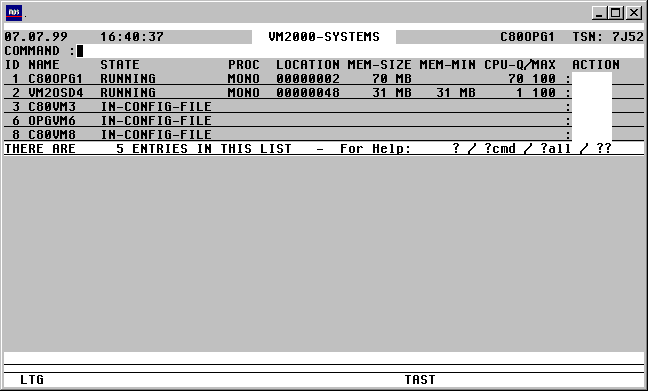

With a mouseclick you get a describtion of the screen item.
Option Statement for global, non VM-specific settings:
OPTION [KEEPOC=Y|N] [, VSN=Y|N] [, LOC=Y|N] [, SHUT=Y|N|Q]
KEEPOC=Y All available Connections will be used as $CONSOLE Connections, all of which will only be closed when TAS itself is terminated. (DC command).
This ensures that the processing time is significantly reduced, with less output going to the console.
KEEPOC=N TAS will use only one CFS Connection for all guest systems. This Connection will be opened and closed for each action which needs to be executed on a guest system.
Standard: KEEPOC=N
VSN=Y Display the VSN and the DEVICE-TYPE in the VMPDT list and in the procedures created with the VMSAVE command.
Standard: VSN=N
LOC=N No display of the position occupied by the VM system in main memory, nor in the procedures created by the VMSAVE command.
Standard: LOC=Y
SHUT=N The SHUT Action Code (Shutdown of a guest system) is not permitted.
SHUT=Q The SHUT Action Code will only be executed after the user has confirmed the request. This can be used to avoid mistakenly entering, for example, the the SH Action Code (Show).
Standard: SHUT=Y
Example of an OPTION statement:
OPTION KEEPOC=Y,VSN=Y,SHUT=Q
Commands: The following entries, amongst others, are possible from the Command field of the screen:
NP* Update the list.
S srch [=INSRT -] Search for a specific entry in the list, and hide it, if required
SORT xxx Sort the list on any field name from the title line
EXPL file Export the list to a file
HC/NHC Control the hardcopy capture of the screen contents.
VMSAVE Save the configuration characteristics and device attachments of VM systems to a file. For a full description of this, see page .
General Remarks about Action Codes in the VMINF Screen
Various Action Codes can be eneterd from the VMINF screen. These Action Codes will cause CFS to open a Connection to $VMCONS. After a successful Connection acknowledgement is received, one or more administration commands will be issued. After the relevant acknowledgement messages are received and displayed on screen, the Connection will automatically be closed.
Action Codes: The following entries are valid from the Action Code field of the VMINF screen:
CON A Connection will be opened to $VMCONS. The command /BEGIN-VM-DIA VM-ID=n,TYPE=*VC will establish a Connection to $CONSOLE of the VM system.
A prerequisite is that a VC (Virtual Console) device type must be generated on the guest system, and that it must have been attached with an /ATT-DEVICE command.
Pressing the K2 key will display the prompt, from which commands can be entered for $CONSOLE of the VM system, or from which messages can be answered. The VM system identifier (e.g. 'GS02') does not need to be specified. Terminating the K2 prompt with just DUE1 or R (Return to CFS) will cause the Connection to be closed and control returned to the VMINF screen.
ACT [n] SHOW-VM-STATUS. A regular, asynchronous display of a screen showing the CPU load of the VM system will be displayed. Pressing the K2 key will terminate the display and return control to the VMINF screen.
n Time interval over which the load status should be updated.
Standard: n = 10 seconds
SH SHOW-VM-ATTRIBUTES. The status of the VM system will be displayed.
HOLD HOLD-VM. The guest system will be paused with a HOLD-VM command.
DEL[N] DELETE-VM. The VM system will be terminated. The device assignment and initialisation will be removed.
N The command will be executed with the operand CHECK-VM-STATUS=*NO
RES RESUME-VM. The pause on the state of the guest system will be removed.
PDT A list of all devices assigned to this VM system will be displayed.
This Action Code will cause a VMPDT ID=n command to be issued.
Pressing the K1 key will switch the display back to the VMINF screen.
U Update. The flagged table entry will be updated.
CREA A new VM system will be initialised. This Action Code can only be used on those entries which have the status "IN-CONFIG-FILE". These are guest systems which have not yet been initialised, but which have a complete generation with relevant peripherals and an initialisation file or /CREATE-VM statements available.
A prerequisite for appearing in the list of VM systems with STATE = "IN-CONFIG-FILE" is the existence of a CREA: control record in the VMCONFIG file. This record must contain the relevant VM index, as well as a /CREATE-VM or /CALL-VM-PROC command. For a description of the CREA: record format, see page .
START The specified VM system will be started. This Action Code can only be entered for those entries in the VMINF list which have the status "INIT-ONLY" or "DOWN". A control record of type STRT: must exist in the VMCONFIG file, and be associated with the correct VM-Index for the guest system to be started. The VM command for starting the VM system will be contained in this record, i.e. either /START-VM or /ENTER. For a description of the STRT: record format, see page .
/ENTER will start a batch process on the current machine, i.e. the machine on which CFS is running. This can then initiate, for example, a Connection to $VMCONS via a CFS procedure, which will then issue the command to start the VM system, and will answer the relevant console messages automatically, as required.
/START-VM: A connection to $VMCONS will be opened and a /START-VM command sent. Finally, a Connection to $CONSOLE of the VM system being started will be established, via a /BEGIN-VM-DIA VM-ID=n,TYPE=*VC command. The Connection will remain open until the timeout value expires. The output from $CONSOLE of the guest system will be displayed on screen and any messages can be answered. This is achieved by pressing the K2 key and entering the text. If anything is enterd in this manner the timeout counter for the Connection is reset. Pressing the K2 key and entering R ("Return to CFS") will close the Connection and prevent the display of any further messages. The startup will continue uninterrupted. The output will be stored as normal in the CONSLOG file of the guest system.
SHUT The specified VM system will be shut down. This Action Code can only be entered for those entries in the VMINF list which have the status "RUNNING".
A control record of type SHUT: must exist in the VMCONFIG file, and be associated with the correct VM-Index for the guest system to be shut down. The VM command for shutting down the VM system will be contained in this record, i.e. either /SHUTDOWN or /RUN. For a description of the SHUT: record format, see page .
In order to perform the SHUT Action Code, a connection to $VMCONS will be opened with a /BEGIN-VM-DIA VM-ID=n,TYPE=*VC command. A Connection will then be made to $CONSOLE of the guest system, and the command to shut down the machine will be sent from there. The Connection will remain open until the "Shutdown completed" message has been received, or the timeout value has expired. The output from the guest system console will be displayed on screen, and any messages can be answered. Pressing the K2 key and entering R ("Return to CFS") will close the Connection and prevent the display of any further messages. The shutdown will continue uninterrupted. The output will be stored as normal in the CONSLOG file of the guest system.
MOVE MOVE-VM. The guest system will be moved to a different memory location.
The LOCATION column in the VMINF screen will be made overwriteable for the relevant VM system. The user can then enter the required memory location to which the system should be moved. The value in megabytes represents the start position in main memory, and should be entered in the same format as that in which it is currently displayed, i.e. in hexadecimal form (VMINF [LOC=H]), or in decimal form. For further information, see the parameter description for VMINF LOC=D|H.
The memory location of the monitor system cannot be modified.
Moving a guest system may be necessary to make space if a guest system is to have its main memory allocation increased (see above EXT Action Code).
EXT EXTEND-VM-MEMORY. The guest system will be assigned more main memory. The MEM-SIZE and MEM-MIN columns in the VMINF screen will be made overwriteable. The user can then enter the required values in decimal format. The memory of the monitor system cannot be extended dynamically.
MEM-SIZE can only be increased up to the beginning of the next system in memory. If the LOCATION column of the VMINF screen is to display values in decimal format (VMINF LOC=D), the maximum allowable value for MEM-SIZE will be calculated as the Location value of the following VM system - Location value of the current VM system.
MEM-MIN is the minimum value to which the memory of the guest system can be reduced using the REDUCE-VM-MEMORY command (RED Action Code).
RED REDUCE-VM-MEMORY. The main memory available to the guest system will be reduced. The values in the MEM-SIZE column of the VMINF screen will be made overwriteable. The user can enter the required value in megabytes and in decimal form.
MEM-SIZE can only be reduced as low as the value permitted in the MEM-MIN column. The main memory of the monitor system cannot be reduced.
CPU MODIFY-VM-ATTR. The CPU quota will be modified for the VM system. The CPU-Q and MAX values for each VM system in the VMINF screen are overwriteable. The user may enter a value in the CPU-Q field which is the percentage of CPU power for this system, relative to the total power available to all VM systems. The value in the MAX column represents the maximum percentage of total CPU power which the VM system can utilise if other VM systems are idle.
MSG Any unanswered BS2000 console messages will be displayed. To achieve this, the VMMSG screen will be displayed (see below).
SAVE[V] The configuration data of the specified VM system will be saved to a file.
The name of the file will either be the default name, CFS.VM-PROC.CREATE.vm-id, or the name specified in the VMCONFIG file by means of a SAVE control record associated with the respective VM Index. For a full description of the SAVE record, see page .
V As for Action Code SAVE, except that the VSN of the discs will additionally be saved in the configuration records as a description.
Record types in the VMCONFIG file for VMINF Action Codes
The VMCONFIG file is a sequential file containing the entries for accessing the consoles of the VM systems. It also contains commands releveant to the different Action Codes which will be executed on the various VM systems.
For a general description of the VMCONFIG file, see pages , and .
II_AAAA:_TTTT_<15___________________________________________________________256>
|   |      |    |
|   |      |    |
|   |      |
Command to $VMCONS for the guest system with Index n
| | |
CREA: /CREATE-VM or
| | |
/CALL-VM-PROC
| | |
STRT: /START-VM or
| | |
/ENTER (executed on the system on which CFS is running)
| | |
SHUT: /SHUTDOWN or
| | |
/RUN
| | |
SAVE: Name of the VMSAVE file for this system [, VSN=Y|N] [, LOC=Y|N]
|   |      |
|   |
Timeout value in seconds (left justified).
| |
After the command has been sent to $VMVONS, all messages will
| |
be displayed on screen until a positive or negative
| |
acknowledgement for the command appears.
| |
The Connection will then automatically be closed and
| |
control returned to the VMINF screen.
| |
The timeout value specified here is the maximum time in seconds
| |
for the acknowledgement to appear. If this does not happen within
| |
this time frame, the Connection will be closed. This is necessary
| |
if an Action Code is controlled from a CFS procedure.
| |
The timeout value will be ignored if the user presses the K2 key
| |
while the messages are being displayed.
| |
No timeout value specified: the system will wait indefinitely for the acknowledgement.
| |
The user will still have the option of closing the Connection
| |
by pressing the K2 key, and entering R ("Return to CFS").
|   |
|
Description of the record type. A record type exists for each Action Code:
|
Action Code Record type
|
CREA CREA:
|
START STRT:
|
SHUT SHUT:
|
SAVE SAVE:
|
VM Index. The command specified from column 15 is valid for the guest system associated with the Index n. The VM Index must be left justified.
A sample VMCONFIG file is included in the CFS.S.LMSLIB library. The PLAM library element is called X/CFS.VMCONFIG.
General remarks regarding the VMCONFIG parameter file
Various Action Codes can be executed from the VMPDT/VMINF/VMMSG VM-specific screens. These Action Codes cause CFS to open a $CONSOLE Connection to the respective BS2000 system. After a successful connection has been made, the command, or sequence of commands to be executed will be sent through that console connection. The Connection will be closed after the messages relating to those commands have been received.
Access to the guest system's $CONSOLE application can be achieved by using static, authorised user processes, or by using dynamic consoles (see the JES User Manual, User Option: Access to $CONSOLE). The entries required to access the $CONSOLE application of the individual guest systems need to be stored in a parameter file. The name of this file is determined according to the following hierarchy:
1) Was a File command with the link name VMCONFIG issued (/FILE ...,LINK=VMCONFIG) ?
If only one monitor system and its respective guest systems are to be administered, then points 2) to 6) are irrelevant.
2) Was a file command with the link name VMINDEX issued (/FILE ..., LINK= VMINDEX) ?
An index file consists exclusively of data records containing the names of VMCONFIG files. Each of these VMCONFIG files describes a monitor system with its respective VM guest system. All monitor and guest systems must be accessible from the current host via a BCAM connection.
3) A check will be made for job name specified in the LOGON command (/.jobname LOGON ...), and prefixed with 'CFS.VMINDEX.'. If a file with this name exists, i.e. CFS.VMINDEX.jobname, then it will be used as the index for the VMCONFIG files.
4) If no job name was specified in the LOGON command, a search will be made for a file named CFS.VMINDEX under the current userid.
5) If neither of the above searches produces a valid file, CFS will search for a file named $user-id.CFS.VMINDEX.jobname . $user-id is the userid under which CFS is stored.
6) A search will be made for the file $user-id.CFS.VMINDEX.
7) Finally, a search will be made for a file called $user-id.CFS.VMCONFIG.
Format of the VMCONFIG Parameter File
The VMCONFIG file is a sequential file containing data relevant for establishing access to the $CONSOLE application on the individual guest machines. A sample file named X/CFS.VMCONFIG is provided in the PLAM library CFS.S.LMSLIB delivered with CFS.
A record with the following format exists per VM system:
II_HHHHHHHH_SSSSSSSS_<22________________________62>_RRRRRRRR_TTTTTT_PPPPPP_<100__139>
|     |         |      |  {____________________________}          |     |         |
|     |         |      |                                          |     |         |
Name of the OPERATOR-ROLE if a
| | | | | | |
dynamic console is used (see Connection
| | | | | | |
Message). The OPERATOR-ROLE must have authorisation
| | | | | | |
to issue ATT- / and DET-DEVICE commands
| | | | | | |
on the monitor system, as well
| | | | | | |
as having authorisation to issue
| | | | | | |
ADD- and SWITCH-VM-DEVICE commands.
|     |         |      |  {_______________________________________}     |         |
|     |         |      |                                                |         |
Timeout value in seconds. This value determines
| | | | | |
the length of time the system will wait for
| | | | | |
a positive or negative acknowledgement
| | | | | |
for an issued command. If no message is
| | | | | |
received within the specified time, the Connection
| | | | | |
will be closed and all further processing
| | | | | |
will be aborted.
| | | | | |
No value specified: the system will wait
| | | | | |
indefinitely for an acknowledgement.
| | | | | |
The user can still terminate the process by
| | | | | |
pressing the K2 key.
|     |         |      |  {_____________________________________________}         |
|     |         |      |                                                          |
Password to initiate BEGIN-VM-DIALOG on the guest system.
| | | | |
*NONE or empty, if no password has been defined.
|     |         |      |                                                          |
|     |         |                                                                 |
Connection Message for the Connection to $CONSOLE.
| | | |
userid,C'passw'
| | | |
for Connections to a statically defined console.
| | | |
@CONSOLE,userid,C'passw'
| | | |
for Connections to a dynamic console.
| | | |
For further information, see the CFS User Manual,
| | | |
Chapter 9 (Connections), OC (Open Connection) Command,
| | | |
Notes about $CONSOLE.
|     |         |                                                                 |
|     |                                                                           |
Optional: predefined Station name for the Connection to $CONSOLE
| | |
This entry is necessary for example to establish a
| | |
site-specific console access. If nothing is specified, the default
| | |
CFS station name will be used: CFSntsn
|     |                                                                           |
|                                                                                 |
Hostname of the monitor or VM guest system, or a standalone system.
|                                                                                 |
                                                                                  |
Index of the Guest systems. The index will be displayed to the left of the respective VM name in the VMPDT/VMINF/VMMSG screen.
|
The monitor system will always have an index value of 1.
|
An empty index field indicates a standalone system (only relevant for VMMSG).
{_________________________________________________________________________________}
Description. This text will only be displayed if the VM system has not been created, i.e. is still in the state
'IN-CONFIG-FILE'.
Format of the VMINDEX File
The VMINDEX file is a sequential file whose records contain the names of the VMCONFIG files, which in turn describe the various monitor and guest systems which are to be administered.
Each monitor system must have a record with the following format:
<1________________________54>
|
|
fully-qualified name of a VMCONFIG file.
Each VMCONFIG file will then contain the access data for a monitor system and the respective guest systems associated with it.