|
PORT open Socket Ports (TCP/IP) in BS2000
The PORT command will display an overview of all open TCP/IP Socket Ports. Action Codes can be used to display the logically connected partner systems, as well as the tasks of the own host associated with the ports. Additionally, Actio Codes can be used to close individual ports or to display the results of a BCSHOW command for the sockets.
The PORT command is available from BCAM V15 (Open Net Server V1.0).
srch Only those open ports whose name contains the specified search string will be displayed. A simple or complex search condition can be specified for srch. For further information, see page .
Example:
PORT ' 23 '
Only the entry relating to TELNET Port 23 will be displayed in the list.
The PORT mask has the following format:
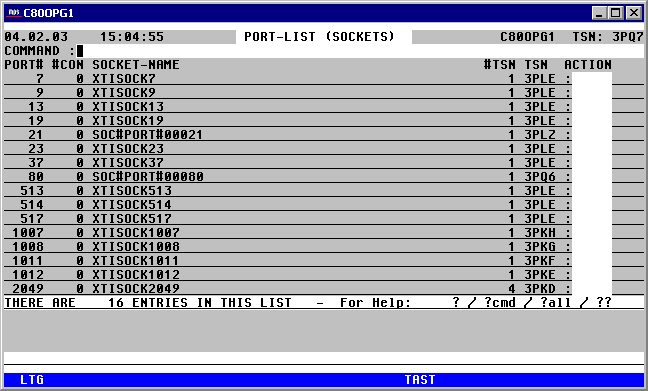

With a mouseclick you get a describtion of the screen item.
Commands: The following entries may be entered from the Command field of the VMMSG mask:
NP* Update the list.
PORT srch PORT command with different selection criteria.
S srch [=INSRT -] Search for a specific entry in the list, and if required, remove it from the list
SORT xxx Sort the list on any attribute in the title line.
EXPL file Export the list to a file
HC/NHC Log the screen to a Hardcopy file.
Action Codes: The following entries can be entered from the Action Code field of the Port mask:
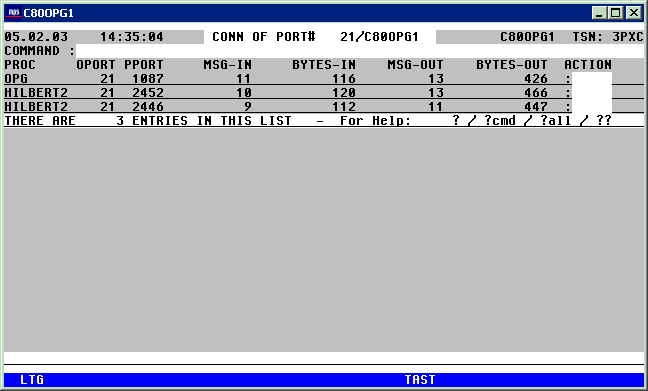
CON A screen will be displayed showing all the partner systems associated with that Port.
From this Connection list, PING can be entered as an Action Code for any displayed partner system.
The Connection list looks as follows:
With a mouseclick you get a describtion of the screen item.
CLS The Socket application associated with this port will be deactivated by means of a /BCAPPL APPL=(SOCKET,...), HOST=..., MODE=DEACTIVATE, TYPE=NORMAL command.
D All Task properties associated with the master TSN (appears in the right-most column of the Port list) will be displayed for a particular port.
NP The task list will display all TSNs associated with this Port in the own system. The Port mask will only display the first TSN in the right-most column.
SHOW A /BCSHOW APPL=(SOCKET,...),SHOW=(TSAP-OPEN, CONN, ROUTE) ,INFO=LONG command will be issued, which will display all relevant data about the Socket application of the specified Port.