
|
VOL list of all volumes of a PVS
VOL This Action Code - entered from the MRS screen for a PVS/Volume set - will result in a list of all volumes associated with this locally-available PVS/Volume set.
If the Action Code is entered from a PDT list, then all volumes associated with the Pubset/Volume set to which the marked volume belongs, will be displayed.
The VOL screen looks as follows:
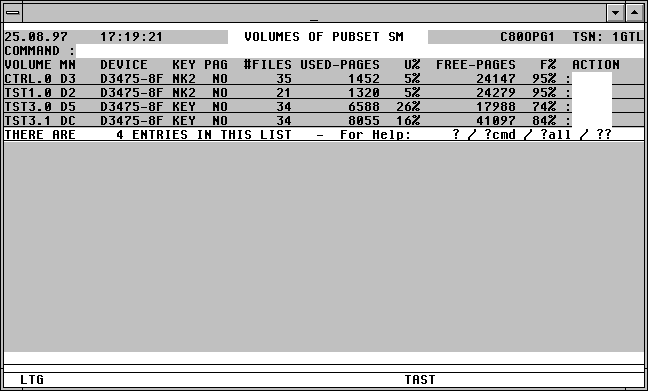

With a mouseclick you get a describtion of the screen item.
Commands: The following entries, amongst others, are permitted from the command field of this screen:
CFS This command returns the user to CFS, if that was from where the MRS screen was called.
NP* Update the list.
POS xxx=yyy Position permanently at a particular list entry, particularly after NP* (xxx = field from title line, yyy = required contents)
PUBSP [pubset] [, FILE=file] [, SUM]
A screen will be displayed in which the utilisation of all available online pubsets, or only particular pubsets, will be displayed.
S srch [=INSRT -] Search for a specific entry in the list, and if required, remove it from the list.
SORT xxx Sort the list on any attribute from the title line
EXPL file Export the list to a file
HC file /NHC Log the screen to a Hardcopy file.
Action Codes: The following Action Codes can be entered from this screen:
FREE A screen will be displayed showing the free blocks on the specified volume, sorted in descending order on free block size.
The format of the screen is described on page .