
|
Task list - - Commands - - SYSACT (System load)
SYSACT [CPU | IO | SVC | PG] [, INT=n] [, TYP=typ] [, VAR=Y]
The SYSACT command is available as from BS2000 V10.0, and displays the current system load.
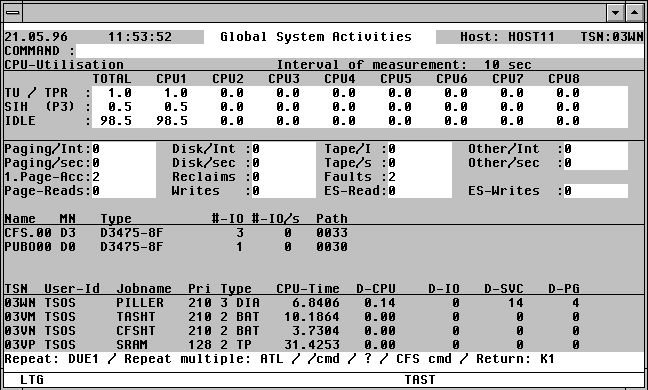

With a mouseclick you get a describtion of the screen item.
For a description of the individual load elements, see page .
CPU | IO | SVC | PG
The tasks which have used the most resources over the measurement period will be displayed in the last quarter of the screen. The layout will be identical to that appearing if a Task list is selected, together with the DELTA User Option (see page ). Specifying one of the optional parameters CPU, IO, SVC, or PG will determine the sort order of the tasks displayed: D-CPU, D-IO, D-SVC, D-PG (Delta CPU, IO, SVC, Paging).
INT=n Length of measurement period. Standard: INT=10.
TYP=typ The second-last section of the SYSACT mask ("NAME MN TYPE ...") is reserved for devices of a specific type. A simple or complex search condition can be specified for typ. For further information, see page . Example: TYP=D or TYP=D3490. Only disk IO's will be monitored if TYP=D is specified.
Standard: All device types will be monitored during the SYSACT analysis.
VAR=Y Specifying this parameter will cause various CFS variables to be created, and assigned respective values from the current SYSACT screen. The evaluation of measurement data in procedures is thus made much easier.
All the variables begin with the prefix SYSACT- (e.g. SYSACT-TSN-HEADER, SYSACT-TSN1). The CFS variables created, and their assocaited values can be used, for example, in a test procedure as follows:
TASNO
SYSACT VAR=Y
*SV
*STOP
Commands:
ATL [INT=m] This command will activate the automatic output mode. Specifying the optional INT=m parameter determines the time in seconds of the measurement intervals. Standard: INT=30.
HC file | NHC Activate/deactivate the Hardcopy mode. All screens displayed between the commands HC and NHC will be saved to the Hardcopy file.
F3 The current file displayed will be saved to the Hardcopy file when the F3 key is pressed.
/cmd Execute the BS2000 command cmd .
n/OCn/CCn/DCn/CD
CFS commands for controlling Connections. For further information, see page .
HELGA Call HELGA as a subprogram. Return by entering the HELGA command END.
TASK tsn A Display function for the task with the specified TSN will be executed. For information on the format of the Display screen, see page . Pressing the K1 key in the Display screen will execute a new SYSACT command.
The SYSACT screen displays a summary of the current system load. A description of the individual fields is given below.
TOTAL: The average of all CPUs (logical machines) is displayed.
CPU1 ... CPU: The load of each individual CPU is displayed.
TU / TPR: Percentage of time spent by the processor during the measurement period in the TU state (Task Unprivileged, P1) or in the TPR state (Task PRivileged, P2).
SIH (P3): Percentage of time spent by the processor during the measurement period in the SIH state (Systems Interrupt Handling), P3).
IDLE: Percentage of time during the measurement period during which the processor was idle.
Paging/Int: Total number of paging IO's during the measurement period.
Note: the sum of the Page Reads and Page Writes values (see below) will not correspond to this Paging/Int value, since the BS2000 memory management system attempts to combine up to 8 pages of Page Writes into one IO operation.
Paging/sec: Average number of paging IO's per second during the measurement period.
1.Page-Acc: Total number of paging interrupts for the first access to a 4k page during the measurement period.
Reclaims: Total number of paging interrupts during the measurement period for which the specified 4k page was in memory.
Faults: Total number of paging interrupts during the measurement period.
Disk/Int: Total number of disk IO's during the measurement period. Paging IO's are not included in this value.
Disk/sec: Average number of disk IO's per second during the measurement period. Paging IO's are not included in this value.
Tape/I: Total number of tape IO's during the measurement period.
Tape/S: Average number of tape IO's per second during the measurement period.
Other/Int: Total number of all other IO's during the measurement period (e.g. printer, FEP, etc.).
Other/sec: Average number of all other IO's per second during the measurement period.
Page-Reads: Total number of 4k pages read from the paging area during the measurement period.
Page-Writes: Total number of 4k pages written to the paging area during the measurement period.
ES-Read: Total number of 4k pages read from the Expanded or Global Storage areas during the measurement period.
ES-Writes: Total number of 4k pages written to the Expanded or Global Storage areas during the measurement period.
NAME: Volume labels (VSN's) of the four most frequently used disks during the measurement period.
MN: Mnemonic name of the disks.
TYPE: Device type of the disk.
#-IO: Total number of individual device IO's during the measurement period.
#-IO/s: Average number of individual device IO's per second during the measurement period.
PATH: Path via which the device is acessible.
TSN, User-Id, Jobname, Pri, Type, CPU-Time:
Entries for the four most active tasks during the measurement period.
D-CPU: CPU time used during the measurement period.
D-IO: Number of IO's performed during the measurement period.
D-SVC: Number of SVC's performed during the measurement period.
D-PG: Number of paging IO's during the measurement period.