
|
Task list - - Commands - - FJAM (Display all FT partner systems)
The FJAM or FT command displays a list of all file transfer partners generated in the network, together with the status of the partner.
srch Only those partners will be displayed whose list entries (see below) contain the specified search string. A simple or complex search condition can be specified for srch. For further information, see page .
Examples: FJAM HOST1, FT ACT, FT 'ACT'+'STD'
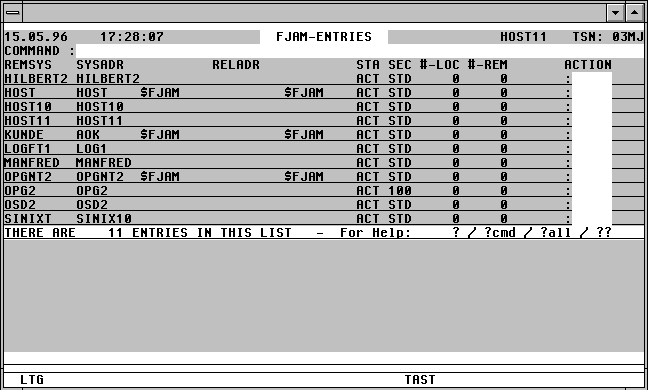

With a mouseclick you get a describtion of the screen item.
Commands:
All commands that can be entered from the task list may also be entered in the FJAM command field. In addition, the following special commands can be entered:
NP* Update the FJAM list.
SORT {REMSYS | SYSADR | STA | #-LOC | #-REM} [, A | D]
Sort the FJAM list is ascending or descending order on the value in the REMSYS, SYSADR, STA, #-LOC, #-REM columns.
POS {REMSYS=name | SYSADR=name}
Position the window directly at the specified entry in the FJAM list.
Action Codes:
The following Action Codes can be entered from the FJAM list.
ACT A FJACT REMSYS=partner command will be issued.
CAN / ABO A CANCEL-FILE-TRANS or FJABO REMSYS=partner command will be issued.
DEA A FJDEACTSYS REMSYS=partner command will be issued.
M A MODIFY-FT-PARTNER name,? command will be issued via SDF. The parameters can then be modified by the user.
MF A MODIFY-FT-PARTNER name,PARTNER-ADDRESS= *FTNEA(?),? command will be issued via SDF.
MP A MODIFY-FT-PARTNER name,PARTNER-ADDRESS= *PRESENTATION(?),? command will be issued via SDF.
NP CFS will be invoked and a summary of all file transfer requests associated with this partner system (NSTAT *ALL,partner) will be displayed. The user can return to the FJAM list by entering the command TAS.
REM A FJREMOVESYS REMSYS=partner command will be issued.
SUB x [y] A FJSUBINFO REMSYS=partner command will be issued.
x x represents the REQUEST= parameter of the FJSUBINFO command.
L REQUEST=LOCAL
R REQUEST=REMOTE
_ REQUEST will not be used as a selection criterion for the output from the FJSUB command.
y y represents the STATE= parameter of the FJSUBINFO command.
A STATE=ACTIVE
F STATE=FINISHED
H STATE=HOLD
L STATE=LOCK
S STATE=SUSPEND
W STATE=WAIT
SYS A FJSYSINFO REMSYS=partner command will be issued.
The following error codes will appear in the right-hand column of the FJAM mask in the event of a command being unsuccessful:
REQ? Error with parameter REQUEST=
STA? Error with parameter STATE=