
|
Task list - - Commands - - PDT (Display all generated devices)
PDT [ATT|DET] The PDT command (Physical Device Table) will display a list of all generated devices, together with their current status.
ATT Display all active devices (Attached)
DET Display all inactive devices (Detached)
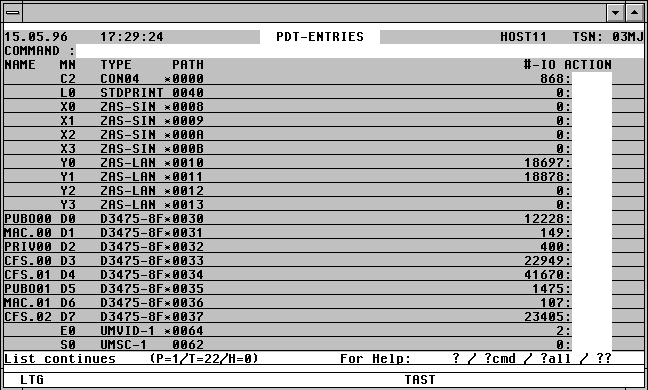

With a mouseclick you get a describtion of the screen item.
Commands: The following entries, amongst others, are possible from the Command field of the screen:
ATL [INT=sec] Asynchronous automatic update of the screen information in the specified time period.
NP* Update the list.
POS xxx=yyy Position the window at a specific list entry, particulary useful after NP* (xxx = field name from the title line, yyy = required field contents)
S srch [=INSRT -] Search for a specific entry in the list, and hide it, if required
SORT xxx Sort the list on any field name from the title line
n/OCn/CCn/DCn/CD
CFS commands for controlling Connections. For further information, see page .
HELGA Call HELGA as a subprogram. Return by entering the HELGA command END.
EXPL file Export the list to a file
HC file /NHC Capture the screen to a hardcopy file.
NP* Update the current PDT List.
Action Codes:
ATT An ATTACH-DEVICE command will be issued for the device via a CFS Console Connection. A connection to $CONSOLE is not necessary as from OSD V2.
CHA x A CHANGE-DISK-/TAPE-MOUNT command will be issued for the device via a CFS Console Connection. A connection to $CONSOLE is not necessary as from OSD V2.
x x represents the ACT= parameter of the CHANGE-DISK-/TAPE-MOUNT command.
C ACT=CANCEL
M ACT=MOVE
P ACT=POSITION (only for TAPE)
CHK [x] A CHECK-DISK-/TAPE-MOUNT command will be issued for the device via a CFS Console Connection. A connection to $CONSOLE is not necessary as from OSD V2.
x x represents the ACT= parameter of the CHECK-DISK-/TAPE-MOUNT command.
R ACT=REPORT
U ACT=UPDATE
DET [x] A DETACH-DEVICE command will be issued for the device via a CFS Console Connection. A connection to $CONSOLE is not necessary as from OSD V2.
x x represents the FORCE= parameter of the DETACH-DEVICE command.
N FORCE=N
Y FORCE=Y
SHC [x] A SHOW-DEVICE-CONFIGURATION command will be issued for the device via a CFS Console Connection. A connection to $CONSOLE is not necessary as from OSD V2.
x x represents the INF= parameter of the SHOW-DEVICE-CONF command.
A INF=ALL
I INF=INNER
O INF=OUTER
P INF=PATH
_ INF=STD
SHD A SHOW-DEVICE command will be issued for the device via a CFS Console Connection. A connection to $CONSOLE is not necessary as from OSD V2.
SHS [x] A SHOW-DISK-/TAPE-STATUS command will be issued for the device via a CFS Console Connection. A connection to $CONSOLE is not necessary as from OSD V2.
x x represents the INF= parameter of the SHOW-DISK-/TAPE-STATUS command.
A INF=ALL
P INF=PARAMETER
S INF=SYSTEMS
T INF=TASK
_ INF=STD
UNL An UNLOCK-DISK command with the parameter SYS-ID=*ALL will be issued for the device via a CFS Console Connection. A connection to $CONSOLE is not necessary as from OSD V2.
The following error codes will appear in the right-hand column of the PDT mask in the event of the specified command not being executed successfully:
OC? A Connection to $CONSOLE from within CFS does not exist. To open one, use the command CFS OCn$CONSOLE, where n is the number of an unused Connection. A Connection to $CONSOLE is not necessary as from OSD V2.
ACT? Error with parameter ACT=
INF? Error with parameter INF=
FOR? Error with parameter FORCE=
nnnn The first two bytes of the DCAM Return code when sending the command to $CONSOLE.
FREE Only for locally-available Pubsets / Volume Sets:
A screen depicting all the free blocks currently existing on the PVS will be displayed, sorted in descending size order.
If the Action Code is entered from a PDT or VOL screen, the list will then represent the free blocks on that volume only.
The screen format is described on page .