
|
Task list - - Commands - - APPL (Display all active applications)
APPL [srch] [,INF=ATTR|STAT] [V=Y|N]
All active applications will be displayed in a list.
srch Only those applications whose name contains the specified string will be displayed. A simple or complex search condition can be specified for srch. For further information, see page .
INF=ATTR The application attributes (such as PREDEF) will be displayed on screen.
The MSG-IN, BYTES-IN, MSG-OUT, BYTES-OUT values for the application will not be displayed in this case.
INF=STAT The names of all connected terminals and processors for all applications will be displayed. The MSG-IN and MSG-OUT values for each terminal will also be displayed.
V=Y|N VHOST=YES: The name of the virtual Host on which it is running will additionally be displayed for each application. In this case, the BYTES-IN and BYTES-OUT columns will be suppressed, due to lack of space. The first APPL command to be issued with the V=Y parameter will make this the standard display format. Any future APPL commands will have the name of the virtual host displayed, even if the command was issued without the V=Y parameter.
VHOST=NO: The format of the list is as shown below, i.e. without the virtual host name, and with the BYTES-IN and BYTES-OUT columns.
The APPL mask has the following format:
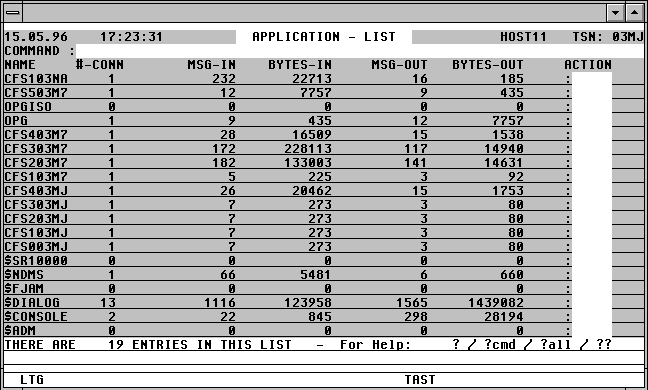

With a mouseclick you get a describtion of the screen item.
Commands: The following entries, amongst others, are possible from the Command field of the screen:
ATL [INT=sec] Asynchronous automatic update of the screen information in the specified time period.
NP* Update the list.
POS xxx=yyy Position the window at a specific list entry, particulary useful after NP* (xxx = field name from the title line, yyy = required field contents)
S srch [=INSRT -] Search for a specific entry in the list, and hide it, if required
SORT xxx Sort the list on any field name from the title line
n/OCn/CCn/DCn/CD
CFS commands for controlling Connections. For further information, see page .
HELGA Call HELGA as a subprogram. Return by entering the HELGA command END.
EXPL file Export the list to a file
HC file /NHC Capture the screen to a hardcopy file.
Action Codes:
Only the following Action Codes are valid from the APPL mask:
NP All tasks which have opened this application will be displayed.
CON All partners with a connection to this application will be displayed in a list, the format of which is described below.
CLS [x] A BCLOSE command will be issued to the application via a Console connection opened from within CFS. A connection to $CONSOLE is no longer necessary as from OSD V2.
x This value corresponds to the Wait parameter of the BCLOSE command.
N W=N
Y W=Y
In the event of the command being unsuccessful, the following error message will be displayed in the right-hand column of the APPL mask:
W? Error for parameter W=
All partners of a specified application will be displayed in a mask as a result of a CON Action Code having been entered from the APPL mask (see above). The Connections mask will have the following format for $CONSOLE, for example:

With a mouseclick you get a describtion of the screen item.
Commands: The following entries, amongst others, are possible from the Command field of the screen:
ATL [INT=sec] Asynchronous automatic update of the screen information in the specified time period.
NP* Update the list.
POS xxx=yyy Position the window at a specific list entry, particulary useful after NP* (xxx = field name from the title line, yyy = required field contents)
S srch [=INSRT -] Search for a specific entry in the list, and hide it, if required
SORT xxx Sort the list on any field name from the title line
n/OCn/CCn/DCn/CD
CFS commands for controlling Connections. For further information, see page .
HELGA Call HELGA as a subprogram. Return by entering the HELGA command END.
EXPL file Export the list to a file
HC file /NHC Capture the screens to a hardcopy file.