
|
Task list - - Commands - - SHOW (Display system tables symbolically)
SHOW [ %tab | A=addr, C=section ] [, T=tsn]
The SHOW command will display system-wide and TSN-specific memory areas, tables and control blocks, together with symbolic field names.
%tab Description of a pre-defined system table. The following may be specified for %tab:
%XVT Executive Vector Table
%TCB Task Control Block
%JCB Job Control Block
%JTBP Job To Be Processed Block
A=addr Virtual address of a system or task-specific table.
C=section Name of the DSECT with which the designated memory area should be addressed.
T=tsn If a task-specific table has been specified with %tab or A=addr, the required TSN can be specified with this parameter. The users' own TSN can be specified as *OWN instead of the actual number.
The system tables will be displayed in the following format:
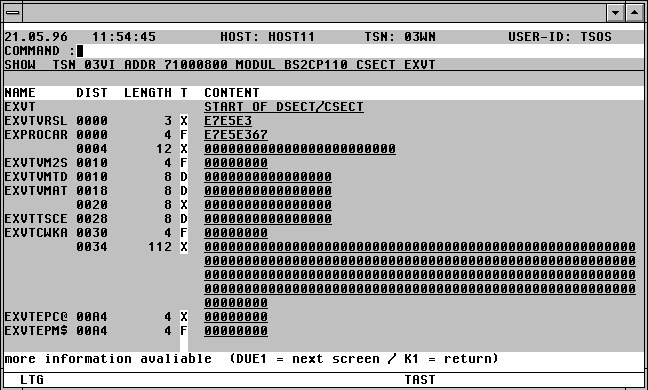

With a mouseclick you get a describtion of the screen item.
The following may be entered from the Command field of the SHOW mask:
/cmd Any BS2000 command.
- Page back one screen.
+ Page forward one screen. Pressing the Enter key with an empty Command field has the same effect as the command '+'.
-- Go directly to the beginning of the table being displayed.
++ Go directly to the end of the table being displayed.
The last screen will not automatically be displayed after entering the "++" command. The last 18 fields of the table will be displayed.
P name The screen will be positioned at the field with the specified name within the table being displayed.
M Activate Modify mode. The contents of the fields of the SHOW mask currently being displayed will be made overwriteable, and may be modified. The current setting of the CAP or LOW mode of CFS (convert/do not convert lowercase to uppercase) will be observed.
Fields displayed in hexadecimal format can be modified by entering the alpha values in the following format: x_ . x is the alpha representation of the required hex value, and must be followed by a blank.
NM Deactivate Modify mode.
DISP addr [, L=len] [, O=offs] [, T=tsn]
The DISP command displays a memory area from the current task, a foreign task or a system area in Display format.
addr Hexadecimal address in the form 70000000, 12F00 or AB1C20. 12F00 and AB1C20 represent an address in the virtual address space of the users' own task, or of a foreign task. 70000000 indicates a system address area.
L=len Length of the area to be displayed in decimal or hex format.
L=100 will be interpreted as a decimal length.
L=1A0 will be interpreted as a hexadecimal length.
L=100H will be interpreted as a hexadecimal length.
Standard: The memory area up to the end of the current 4k page will be displayed.
O=offs The specified offset will be added to addr. The resulting value is the starting point fo the memory display. offs must be specified in the same format as addr.
Standard: O=0
T=tsn TSN of the task whose memory should be displayed. Leading zeroes can be omitted when specifying the TSN.
Standard: Current TSN.
Pressing the K1 key will return the user to the screen last displayed with DISP. Pressing K13 (ESC <) or entering the command NEW will return the user from any DISP level to the Task list.
Input Column (T) of the SHOW Mask
C | X Thr display format of the data and instruction fields of the SHOW mask can be changed from character to hexadecimal by the user entering C or X in the T field.
+ The field marked will be the first displayed on the next screen. Marking a field with '+' can only be done for fields with symbolic names.
* If the field marked with * consists of a four byte address, then the contents of the virtual address space indicated by this address will be displayed.
Notes:
The DISP command can also be used to display task-specific memory areas, or system memory. For further information, see page .
To display task-specific tables, the %tab Action Code can also be used. For further information, see page .
The symbolic descriptions must have been created with the variable acton ONX(GENSYM) CFS.SYSTEM.SYMBOLS,D=Y under CFS from the ISD information of the assembler modules (Assemble with ISD=YES). The source code for two of the most frequently used system tables are contained in the CFS.S.LMSLIB under the names S/BS2CP095 and S/BS2CP100.
The file used by the SHOW command, CFS.SYSTEM.SYMBOLS, must be cataloged under the same userid as CFSLIB.
If the SHOW command is executed without any operands being specified, a mask requesting the operands in the following format will be displayed: