
|
Task list - - Commands - - FEP (Front End Processors)
FEP [srch] The FEP command displays all generated FEP's, or those included in the current session by means of a BCIN command.
srch Only those FEPs whose list entries (see below) contains the specified search string will be displayed. A simple or complex search condition can be specified for srch. For further information, see page .
Examples: FEP SINIX, FEP BCACT, FEP 'BCACT'+'TCP'
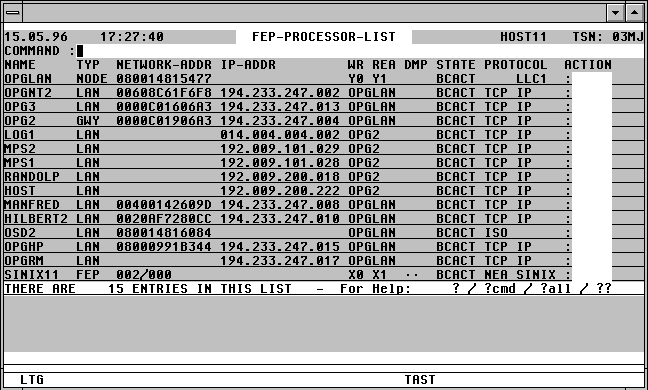

With a mouseclick you get a describtion of the screen item.
Commands: The following entries, amongst others, are possible from the Command field of the screen:
ATL [INT=sec] Asynchronous automatic update of the screen information in the specified time period.
NP* Update the list.
POS xxx=yyy Position the window at a specific list entry, particulary useful after NP* (xxx = field name from the title line, yyy = required field contents)
S srch [=INSRT -] Search for a specific entry in the list, and hide it, if required
SORT xxx Sort the list on any field name from the title line
n/OCn/CCn/DCn/CD
CFS commands for controlling Connections. For further information, see page .
HELGA Call HELGA as a subprogram. Return by entering the HELGA command END.
EXPL file Export the list to a file
HC file /NHC Capture the screens to a hardcopy file.
Action Codes:
Only the following Action Codes may be entered from a FEP list:
NP This Action Code will display all $DIALOG tasks connected to BS2000 via this processor.
IN x [y] A BCIN command will be issued for this processor via a Console connection opened from within CFS. A connection to $CONSOLE is not necessary as from OSD V2.
x Appending x allows the INI= parameter of the BCIN command to be specified.
A INI=ALL
L INI=LOCAL
N INI=NODE
O INI=ONLY
y y is the ACT= parameter of the BCIN command.
A ACT=ALL
L ACT=LOCAL
N ACT=NODE
O ACT=ONLY
Y ACT=YES
OUT [x] [y] A BCOUT command will be issued for this processor via a Console connection opened from within CFS. A connection to $CONSOLE is not necessary as from OSD V2.
x x is the W= parameter of the BCOUT command.
N W=N
Y W=Y
_ W=Standard (The blank must be specified if y is to be included)
y y is the OUT= parameter of the BCOUT command.
A OUT=ALL
L OUT=LOCAL
N OUT=NODE
O OUT=ONLY
ACT [x] A BCACT command will be issued for this processor via a Console connection opened from within CFS. A connection to $CONSOLE is not necessary as from OSD V2.
x x is the ACT= parameter of the BCACT command.
A ACT=ALL
L ACT=LOCAL
N ACT=NODE
O ACT=ONLY
_ ACT=Standard
DAC [x] [y] A BCDAC command will be issued for this processor via a Console connection opened from within CFS. A connection to $CONSOLE is not necessary as from OSD V2.
x x is the W= parameter of the BCDAC command.
N W=N
Y W=Y
_ W=Standard (The blank must be specified if y is to be included)
y y is the DAC= parameter of the BCDAC command.
A DAC=ALL
L DAC=LOCAL
N DAC=NODE
O DAC=ONLY
GEN [IN] BCGEN. The columns "NAME", "NETWORK-ADDR" and "IP-ADDR" will be highlighted in this screen for this processor. The user can then enter a new name in the "NAME" field and/or a new address in the "IP-ADDR" field. The amendments made to these fields will become effective immediately. TAS will execute the necessary BCOUT and BCGEN commands automatically. A connection to $CONSOLE is no longer necessary as from OSD V2. A new IP address must be entered in the format nnn. nnn.nnn.nnn . Addresses for TRANSDATA processors must be in the format nnn/mmm (nnn: processor number, mmm: region number). Before implementing the changes with a BCGEN command, the existing processor will be removed from service by means of a BCOUT command.
IN The suffix IN will cause the new processor to be activated immediately with a BCIN and BCACT command.
PING [n] A PING command to send test packets to the specified TCP/IP processor will be executed. The PING Action Code is only available from BCAM V13.
n Number of PING packets: 0 <= n <= 9. 0 indicates the maximum permissable (20).
Standard: 1 packet will be sent.
PIN [n] A PING command will be executed for the TCP/IP processor with the specified name (Ping parameter PNAME=xxxx).
SHOW The TCP/IP configuration data of the processor specified will be displayed. The SHOW Action Code is available from BCAM V13.
TRACE A PING command with a TYPE=TRACE parameter will be executed for the specified processor. This is equivalent to the tracert command under SINIX or Windows. The TRACE Action Code is available from BCAM V13.
The following error codes will be displayed in the right-hand column of the FEP screen in the event of a command being unsuccessful:
OC? No connection has been made to $CONSOLE from within CFS. To open a console, the command CFS OCn$CONSOLE should be given. n is the number of an unused Connection. A Connection to $CONSOLE is not necessary as from OSD V2.
ACT? Error with parameter ACT=
DAC? Error with parameter DAC=
INI? Error with parameter INI=
OUT? Error with parameter OUT=
W? Error with parameter W=
nnnn The first two bytes of the DCAM Return code when sending to $CONSOLE.