
|
VMPDT device administration for VM
VMPDT [srch] [, ID=n] [, F=fam] [, HOST=host] [, VSN=N|Y]
The VMPDT command will display a screen of all generated devices, together with their current assignment to a virtual system or Monitor system. The devices and printers can be switched between the different systems by means of Action Codes.
srch Only those devices whose list entry contains the search string will be displayed. A simple or complex search condition can be specified for srch. For further information, see page .
Examples:
VMPDT T0
Only the entry relating to the device with the mnemonic T0 will be displayed.
VMPDT VM0002
Only those devices assigned exclusively, or as shared devices, to the guest system VM002 will be displayed.
ID=n Only the device list for the guest system with the VM-ID of n will be displayed.
F=fam Only the devices with the specified family type will be displayed.
VMDISK Display all disc devices and their respective volumes. This equates to the command VMPDT F=DISK,VSN=Y
VMTAPE Display all tape devices and their respective volumes. This equates to the command VMPDT F=TAPE,VSN=Y
VMPRINT Display all printers. This equates to the command VMPDT F=PRINT
HOST=host Only the devices for the system associated with the specified BCAM host name will be displayed.
VSN=Y The device type, as well as the VSN for discs and tapes will be displayed in the list. The current VSN of the device can only be ascertained if that device is connected to the system and has been made available by means of an Attach command.
Using the VSN=Y option will cause CFS to connect to the console of all active guest systems, to issue the necessary commands, and then to analyse the output from each console. Significantly longer response times for the display of the VMPDT list must therefore be expected when using this option.
The VSN=Y option will be stored for further VMPDT options and only needs to issued once.
VSN=N The option VSN=N needs to be issued for later VMPDT calls if the display is to return to the original mode.
Examples:
VMPDT F=DISK
VMPDT F=TAPE
VMPDT F=PRINTER
VMPDT F=TAPE
VMPDT F=CONSOLE
The VMPDT list has the following format:
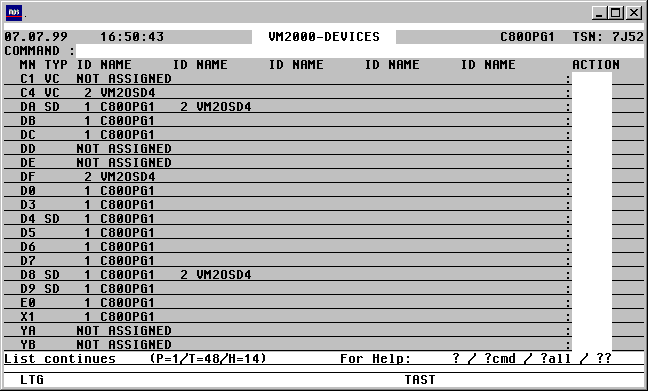

With a mouseclick you get a describtion of the screen item.
Commands: The following entries, amongst others, are possible from the Command field of the screen:
NP* Update the list
S srch [=INSRT -] Search for a specific entry in the list, and hide it, if required
SORT xxx Sort the list on any field name from the title line
EXPL file Export the list to a file
HC/NHC Capture the screen contents to a hardcopy file.
VMSAVE Save configuration and device details of the VM systems to a file. For a full description see page .
General remarks regarding the VMCONFIG parameter file
Various Action Codes can be executed from the VMPDT/VMINF/VMMSG VM-specific screens. These Action Codes cause CFS to open a $CONSOLE Connection to the respective BS2000 system. After a successful connection has been made, the command, or sequence of commands to be executed will be sent through that console connection. The Connection will be closed after the messages relating to those commands have been received.
Access to the guest system's $CONSOLE application can be achieved by using static, authorised user processes, or by using dynamic consoles (see the JES User Manual, User Option: Access to $CONSOLE). The entries required to access the $CONSOLE application of the individual guest systems need to be stored in a parameter file. The name of this file is determined according to the following hierarchy:
1) Was a File command with the link name VMCONFIG issued (/FILE ...,LINK=VMCONFIG) ?
If only one monitor system and its respective guest systems are to be administered, then points 2) to 6) are irrelevant.
2) Was a file command with the link name VMINDEX issued (/FILE ..., LINK= VMINDEX) ?
An index file consists exclusively of data records containing the names of VMCONFIG files. Each of these VMCONFIG files describes a monitor system with its respective VM guest system. All monitor and guest systems must be accessible from the current host via a BCAM connection.
3) A check will be made for job name specified in the LOGON command (/.jobname LOGON ...), and prefixed with 'CFS.VMINDEX.'. If a file with this name exists, i.e. CFS.VMINDEX.jobname, then it will be used as the index for the VMCONFIG files.
4) If no job name was specified in the LOGON command, a search will be made for a file named CFS.VMINDEX under the current userid.
5) If neither of the above searches produces a valid file, CFS will search for a file named $user-id.CFS.VMINDEX.jobname . $user-id is the userid under which CFS is stored.
6) A search will be made for the file $user-id.CFS.VMINDEX.
7) Finally, a search will be made for a file called $user-id.CFS.VMCONFIG.
Format of the VMCONFIG Parameter File
The VMCONFIG file is a sequential file containing data relevant for establishing access to the $CONSOLE application on the individual guest machines. A sample file named X/CFS.VMCONFIG is provided in the PLAM library CFS.S.LMSLIB delivered with CFS.
A record with the following format exists per VM system:
II_HHHHHHHH_SSSSSSSS_<22________________________62>_RRRRRRRR_TTTTTT_PPPPPP_<100__139>
|     |         |      |  {____________________________}          |     |         |
|     |         |      |                                          |     |         |
Name of the OPERATOR-ROLE if a
| | | | | | |
dynamic console is used (see Connection
| | | | | | |
Message). The OPERATOR-ROLE must have authorisation
| | | | | | |
to issue ATT- / and DET-DEVICE commands
| | | | | | |
on the monitor system, as well
| | | | | | |
as having authorisation to issue
| | | | | | |
ADD- and SWITCH-VM-DEVICE commands.
|     |         |      |  {_______________________________________}     |         |
|     |         |      |                                                |         |
Timeout value in seconds. This value determines
| | | | | |
the length of time the system will wait for
| | | | | |
a positive or negative acknowledgement
| | | | | |
for an issued command. If no message is
| | | | | |
received within the specified time, the Connection
| | | | | |
will be closed and all further processing
| | | | | |
will be aborted.
| | | | | |
No value specified: the system will wait
| | | | | |
indefinitely for an acknowledgement.
| | | | | |
The user can still terminate the process by
| | | | | |
pressing the K2 key.
|     |         |      |  {_____________________________________________}         |
|     |         |      |                                                          |
Password to initiate BEGIN-VM-DIALOG on the guest system.
| | | | |
*NONE or empty, if no password has been defined.
|     |         |      |                                                          |
|     |         |                                                                 |
Connection Message for the Connection to $CONSOLE.
| | | |
userid,C'passw'
| | | |
for Connections to a statically defined console.
| | | |
@CONSOLE,userid,C'passw'
| | | |
for Connections to a dynamic console.
| | | |
For further information, see the CFS User Manual,
| | | |
Chapter 9 (Connections), OC (Open Connection) Command,
| | | |
Notes about $CONSOLE.
|     |         |                                                                 |
|     |                                                                           |
Optional: predefined Station name for the Connection to $CONSOLE
| | |
This entry is necessary for example to establish a
| | |
site-specific console access. If nothing is specified, the default
| | |
CFS station name will be used: CFSntsn
|     |                                                                           |
|                                                                                 |
Hostname of the monitor or VM guest system, or a standalone system.
|                                                                                 |
                                                                                  |
Index of the Guest systems. The index will be displayed to the left of the respective VM name in the VMPDT/VMINF/VMMSG screen.
|
The monitor system will always have an index value of 1.
|
An empty index field indicates a standalone system (only relevant for VMMSG).
{_________________________________________________________________________________}
Description. This text will only be displayed if the VM system has not been created, i.e. is still in the state
'IN-CONFIG-FILE'.
Format of the VMINDEX File
The VMINDEX file is a sequential file whose records contain the names of the VMCONFIG files, which in turn describe the various monitor and guest systems which are to be administered.
Each monitor system must have a record with the following format:
<1________________________54>
|
|
fully-qualified name of a VMCONFIG file.
Each VMCONFIG file will then contain the access data for a monitor system and the respective guest systems associated with it.
Action Codes: The following entries are allowed in the Action Code field of the VMPDT screen:
CON[n] A $CONSOLE Connection will be enabled to the VM associated with the index n.
The index n value can be omitted for Non Shared Devices, i.e. those which can only be assigned to a single VM.
Pressing the K2 key will display the prompt, permitting commands to be issued from the console, or messages to be acknowledged.
Terminating the K2 prompt with DUE1 or by entering R (Return to CFS) will cause the Connection to be closed and the VMPDT re-displayed.
ADDn[S] ADD-VM-DEVICE. The device will be assigned to the VM associated with the index n as a usable device.
The ADD Action Code does not result in the device also being made available locally to the guest system, as if an /ATT-DEVICE command had been issued. The ATT[n] Action Code should be used instead.
S Shareable. The suffix S will result in the device being assigned to the guest system as a Shared Device (ADD-VM-DEVICE ..., TYP=*SD). S only needs to be included for the first guest system if it is to be shared. The ADD Action Code for second and additional VM's does not need the S suffix. The first Shared Device assignment will be recognised automatically.
The Action Code SHRn can be used instead of ADDnS.
ATT[n] ATTACH-DEVICE. The device will be made available locally to the VM with the index n. The index identifier n can be omitted for Non Shared Devices, which may only be assigned to one VM system.
DET[n] [F] DETACH-DEVICE. The device will be detached from the from the VM system associated with the index n. The index identifier n can be omitted for Non Shared Devices, which may only be assigned to one VM system.
F The DETACH-DEVICE command will be issued with the FORCE=*YES parameter.
REM[n] [F] REMOVE-VM-DEVICE. The device will be removed from the guest system associated with the index n. A prerequisite of this Action Code is that the device has first been detached locally from the relevant VM machine by means of a DETn[F] Action Code. The index identifier n can be omitted for Non Shared Devices, which may only be assigned to one VM system.
F The REMOVE-VM-DEVICE command will be issued with the FORCE=*YES parameter.
SWn[F] SWITCH-VM-DEVICE. The device will be removed from the VM system to which it is currently assigned (e.g. the system with the index identifier m) and assigned to the VM system with the index identifier n. The following commands will be executed on the various consoles:
$CONSOLE of the guest system m /DETACH-DEVICE
$VMCONS (Monitor system) /SWITCH-VM-DEVICE
$CONSOLE of the guest system n: /ATTACH-DEVICE
If the guest system m (the system to which the device was attached up to now) is no longer functional, then the SW Action Code cannot be used to switch the device. In this case, the Action Codes should be issued individually, in the following order: REM[m], ADD[n], ATT.
F The DETACH-DEVICE command will be issued with a FORCE= *YES parameter.
SW SWITCH-VM-DEVICE.
Similar to the Action Code SWn (see above), except that the BCAM name of the host will be requested rather than the VM-Id.
SHC SHOW-DEVICE-CONFIGURATION. A /SHOW-DEVICE-CONFIGURATION command will be issued from the console of the guest system to which the device is attached. The output will be displayed on the current (CFS) screen.
SHD SHOW-DEVICE-STATUS. A /SHOW-DEVICE-STATUS command will be issued from the console of the guest system to which the device is attached. The output will be displayed on the current (CFS) screen.
SPn Switch Printer. The printer will be removed from the VM system to which it is currently assigned (e.g. the system with the index identifier m) and assigned to the VM system with the index identifier n. A prerequisite for the SP Action Code is that the relevant guest systems m and n are running. The following commands will be executed on the relevant consoles:
$CONSOLE of the guest system m /SD DEV=..,USE=NO
$CONSOLE of the guest system m /DETACH-DEVICE
$VMCONS (Monitor system) /SWITCH-VM-DEVICE
$CONSOLE of the guest system n: /ATTACH-DEVICE
$CONSOLE of the guest system n: /SD DEV=..,USE=...
If the guest system m (the system to which the printer was attached up to now) is no longer functional, then the SP Action Code cannot be used to switch the device. In this case, the Action Codes should be issued individually, in the following order: REM[m], ADD[n], ATT.
If required, the printer can be started on the new guest system n with individual parameters. A guest system-specific SD command can be inserted in the VMCONFIG file for each printer. The printer- and guest system-specific parameter records should be appended to the VMCONFIG file, and should conform to the following format:
II_PRNT:_MNMN_<15___________________________________________________________256>
|   |      |    |
|   |      |    |
|   |      |
SD Command to assign the printer to the guest system
| | |
with the index n : /SD DEV=...,USE=...
| | |
If no PRNT record exists for a printer, it will be
| | |
assigned with a default command /SD DEV=...,USE=OUTPUT .
|   |      |
|   |
Device mnemonic of the printer in the guest system n.
|   |
|
Constant string 'PRNT:' for identifying the record type "Parameter record for printer"
|
VM Index. The SD command is only valid for the guest system with the index identifier n. The VM index must be specified left-justified.
An example of a PRNT record is contained in the X/CFS.VMCONFIG sample file in the CFS.S.LMSLIB library delivered with CFS.
SPnN As for Action Code SPn, see above, except that the command SD DEV=...,USE=...will not be executed for the VM system to which the printer is switched.
SP Switch Printer.
As for Action Code SPn, see above, except that the user will be requested to provide the BCAM name of the host to which the printer should be switched, instead of the VM-Id.
SPN Switch Printer.
As for Action Code SP, see above, except that the command SD DEV=...,USE=...will not be executed for the VM system to which the printer is switched.
U Update. The marked table entry will be updated.